AI Assistant Memory and Privacy: What Deleting a Chat Does Not Tell You
A practical data map for chat history, saved memory, retrieval stores, connected apps, provider logs, model improvement, retention, and deletion.
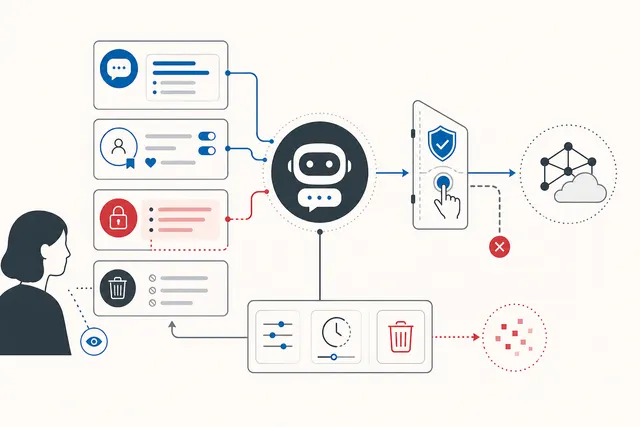
An AI assistant can appear to have one memory while its operator is actually managing several different data systems. The current prompt, conversation history, saved profile facts, files in a retrieval index, connected applications, safety logs, and data used to improve a model may have different controls and retention periods.
That distinction matters when someone asks a simple question such as: “If I delete this chat, is my information gone?” The interface action may remove the conversation from view without addressing every other copy or derived record. The correct answer depends on the product, account type, administrator settings, region, and the provider’s current documentation.
The safest approach is to map the data lifecycle before sending sensitive information, then test the available controls with the same care used for any business system.
Start with a data map, not the memory label
“Memory” is a product word, not a complete technical description. Separate at least these layers:
- Request context. The current prompt, attached files, tool results, and recent messages supplied to produce an answer.
- Conversation history. Chats stored in the user interface and possibly referenced in later conversations.
- Saved memory or profile. Facts intentionally or automatically retained for personalization outside a single chat.
- Retrieval storage. Documents, embeddings, indexes, notebooks, or knowledge bases that an assistant searches.
- Connected services. Email, calendars, cloud drives, customer systems, or third-party tools with their own records and permissions.
- Operational records. Security, abuse-prevention, billing, diagnostics, and audit logs.
- Model-improvement data. Content that may be reviewed or used to improve services, depending on the product and settings.
- Backups and legal holds. Copies retained for recovery, security, compliance, or legal obligations.
One piece of text may move through several layers. Disabling personalization does not necessarily delete old chats. Deleting a chat may not remove a separately saved memory. Disconnecting an application may stop future access without erasing information already copied into a conversation.
Ask five questions for every layer
For each data store, document:
- what enters it, including prompts, outputs, uploads, metadata, feedback, and tool results;
- why it is processed and whether that purpose can be disabled;
- who can access it, including administrators, reviewers, subprocessors, and connected applications;
- how long it remains and what starts the retention clock;
- which action exports, corrects, deletes, or restricts it.
The NIST Privacy Framework treats privacy as an organizational risk-management problem, not merely a settings page. The UK Information Commissioner’s guidance on AI and data protection likewise emphasizes purpose, data minimization, retention, accountability, and individual rights. Those principles are useful even when a particular law does not apply.
Read provider controls literally
Product documentation can reveal where controls do not overlap. OpenAI’s Memory FAQ, for example, distinguishes saved memories from chat history and describes separate controls for reviewing and deleting memory.
These are examples, not universal promises. Features and policies change. Consumer, enterprise, education, API, and region-specific offerings can behave differently. Record the product name, plan, policy version, date reviewed, and relevant administrator configuration instead of assuming that a familiar brand has one retention policy.
Deletion is a workflow
A defensible deletion request should identify the object and every known destination. A practical sequence is:
- Export or record what must be preserved for legitimate business or legal reasons.
- Delete the conversation or activity entry.
- Review and delete saved memories or personalization facts separately.
- Remove uploaded files, notebooks, vector stores, custom assistants, or project knowledge.
- Revoke connected-app access and inspect the connected service for copies created there.
- Remove shared links and externally published artifacts.
- Check feedback, evaluation, support, and annotation systems if the content entered them.
- Confirm the provider’s backup, safety-log, and legal-retention treatment.
- Test a new session to see whether the deleted fact is still retrieved.
- Keep evidence of the request and the provider’s response when accountability matters.
Testing retrieval is useful but not proof of erasure. A system can stop displaying a fact while a restricted backup or security record remains. Conversely, a model may independently generate the same public fact after all user-specific copies were deleted.
Minimize before the prompt is sent
Deletion is weaker than avoiding unnecessary collection. Before using an assistant:
- remove secrets, credentials, personal identifiers, and irrelevant document sections;
- replace real records with synthetic examples when testing;
- use the least-privileged connector and the narrowest file scope;
- separate public, internal, confidential, and regulated workflows;
- set retention defaults appropriate to the data class;
- disable optional improvement or human-review pathways when required and available;
- prevent outputs from being copied automatically into logs, tickets, analytics, or chat systems;
- define who owns deletion when an employee, vendor, or customer leaves.
For enterprise use, an approved assistant should have a named owner, a data-flow diagram, access reviews, incident procedures, and an exit plan. “The vendor says it is secure” is not a substitute for knowing which data was sent and where it can persist.
Treat connected tools as new disclosures
An assistant with access to email or cloud storage is no longer just a text box. It can retrieve content from one system, transform it, and send the result to another. Each tool call can create another record with another controller, retention rule, and audit trail.
Review both directions:
- What can the assistant read from the connected service?
- What can it create, send, publish, purchase, or delete?
- Does disconnecting the tool revoke only future access?
- Are retrieved excerpts copied into chat history or logs?
- Can a malicious document instruct the assistant to disclose other data?
- Can administrators reconstruct actions after an incident?
Use read-only access by default, require confirmation for consequential actions, and isolate high-risk data sources. Connector convenience should not silently expand the privacy boundary.
A compact review checklist
Before approving an AI assistant, confirm that the team can answer:
- Which memory layers exist in this exact product and plan?
- Which are on by default?
- Is content used for service improvement or human review?
- Can users and administrators export, correct, and delete each layer?
- What survives chat deletion, account deletion, or connector revocation?
- What are the normal, backup, safety, and legal retention periods?
- Are third-party tools and subprocessors included in the map?
- Can deletion be verified and audited?
- Is there a rule preventing sensitive data from entering unsupported workflows?
AI memory is useful precisely because information persists and reappears. Privacy depends on making that persistence explicit, limited, controllable, and testable. A single delete button cannot answer a system-level question.